
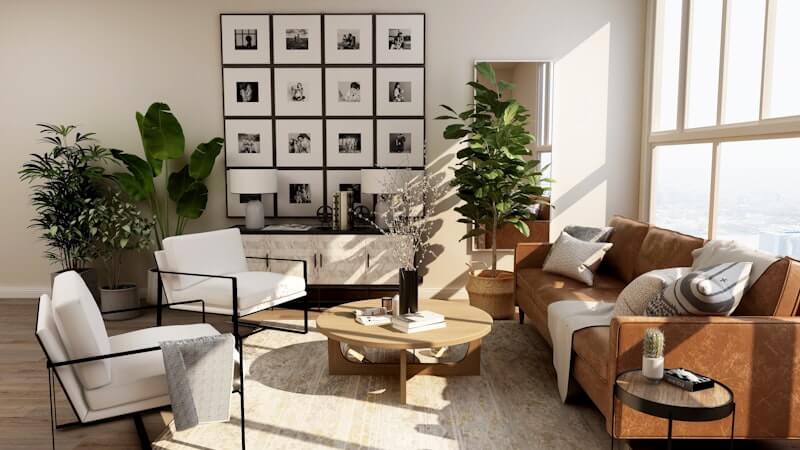
From Days to Seconds: How AI Interior Design Changes the Cost of Creativity
See how AI interior design lowers the cost of early room planning by turning a real room photo into fast visual concepts before renovation or decoration.
Redesigning a room often begins with excitement. You imagine a brighter living room, a calmer bedroom, a warmer kitchen, or a more welcoming Airbnb. You save references, compare colors, look at furniture, and try to picture how everything might work together.
Then the practical questions arrive. Will the style fit your actual room? Is the color palette too dark? Do you need a full renovation, or would better lighting and furniture direction be enough? Should you pay for a professional concept before you even know what you want?
That early uncertainty is where AI interior design becomes useful. It does not replace every part of professional design, but it can make the first visual step dramatically faster and cheaper. With Roomagic, you can upload a room photo, choose a design style, and generate a realistic redesign direction in seconds.
This article is adapted from the original Roomagic story published on Medium, expanded here with practical examples for people comparing AI room design tools, renovation ideas, and early-stage interior planning workflows.
The hidden cost of traditional interior design
Professional interior design is valuable work. Good designers understand proportion, lighting, materials, construction limits, ergonomics, and the emotional feel of a space. But even before construction or shopping begins, the early visualization stage can require meaningful time and budget.
A designer may need to understand your room, collect references, build a mood board, create a layout direction, produce renderings, discuss revisions, and refine the concept. For larger projects, that process is worth it. For early exploration, it can feel too expensive to start.
Many homeowners, renters, small business owners, cafe owners, and Airbnb hosts are not ready for a full design engagement on day one. They first need to answer a simpler question: what could this room become?
Why AI changes the first step
AI room design changes the economics of early creativity. Instead of waiting days for an initial concept, you can test several directions from the room you already have.
That matters because design decisions are hard to make in the abstract. A Japandi bedroom may look beautiful in a reference image but feel too plain in your own space. A Modern living room may look polished online but too cold with your flooring. A warmer Scandinavian direction may be more realistic for your budget and lifestyle.
When you use AI interior design from a real photo, you can compare those options visually. You are not guessing from generic inspiration. You are looking at your walls, windows, floor, furniture scale, and natural light transformed into different directions.
Lowering the cost of exploration
The biggest benefit is not only speed. It is the ability to explore without committing too early.
Before buying furniture, repainting walls, booking a contractor, or hiring a designer for a full package, you can generate a few concepts and decide which direction deserves more attention. One result might show that a darker palette makes the room feel smaller. Another might reveal that a light wood and neutral scheme solves most of the problem. A third might inspire a more ambitious renovation.
This makes AI interior design a practical planning layer between imagination and action. It helps you move from "I want this room to feel better" to a clearer visual direction you can discuss, save, or refine.
If you want to understand the workflow in more detail, see the AI interior design features page. To look at public before-and-after examples, browse Explore.
For room-specific planning, the same idea applies differently by space. A bedroom redesign usually starts with calm, light, and storage. A living room redesign often starts with seating, focal point, and rug scale. A rental redesign may start with listing photos and guest expectations. Those differences are why a real room photo matters more than a generic prompt.
Who benefits from faster room visualization?
Homeowners can use AI interior design before investing in furniture, paint, lighting, or renovation. A realistic concept can prevent expensive mistakes and help the household agree on a direction.
Renters can use it to test decoration-first changes. Even when they cannot rebuild the room, they can explore color, lighting, furniture mood, rugs, wall art, plants, and storage.
Airbnb and short-term rental hosts can use it to improve visual appeal before upgrading a listing. A stronger bedroom, living room, or guest suite concept can make the property feel more intentional.
Small businesses can use it for early atmosphere planning. Cafes, studios, salons, restaurants, shops, and offices often need a better visual direction before paying for detailed design work.
Interior designers can also use AI as a brainstorming tool. It can accelerate mood exploration and client communication, especially before a project direction is fully defined.
AI and designers can work together
AI interior design should not be treated as a replacement for human taste or professional judgment. Real projects still need measurement, budget planning, materials, safety, construction details, and experience.
But AI can make the first conversation better. Instead of starting with vague language like "modern but cozy" or "minimal but not empty," you can bring a visual reference generated from the actual room. That makes feedback more specific. You can say what feels right, what feels wrong, and what you want to explore next.
That is why the technology feels different. It lowers the cost of seeing possibilities. It reduces the fear of starting. It gives more people access to visual direction before they make expensive choices.
Try the first version of your dream room
For years, interior visualization was locked behind professional tools, long timelines, and high costs. Now the first version of a room idea can appear in seconds.
Start with a clear photo, choose a style, and generate a few directions. Then compare what feels realistic, beautiful, and useful for your next decision. You can try Roomagic for fast AI room design, review plan options on Pricing, or explore more room makeover examples in Explore.