
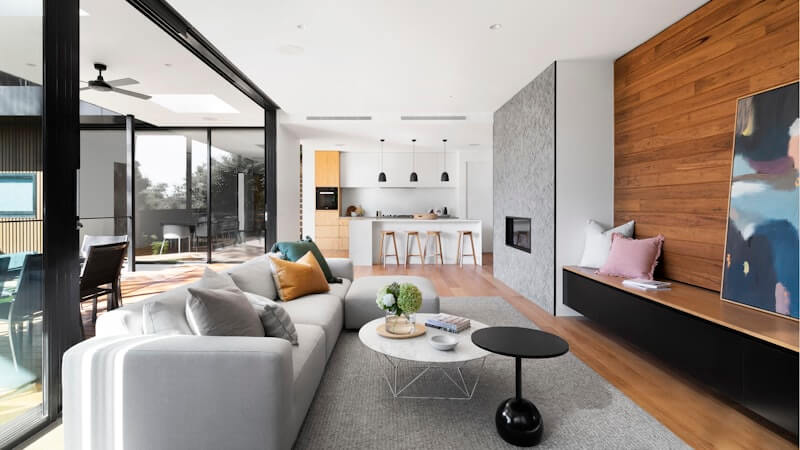
AI Living Room Design From Photo: Preview Layout, Style, and Mood
Learn how AI living room design from a photo helps you compare layouts, colors, lighting, and interior styles before buying furniture or renovating.
The living room is often the hardest room to redesign because it has to do many jobs at once. It may be a family space, TV room, reading corner, guest area, play zone, and the first room people notice when they visit.
That makes guessing expensive. A sofa can be the right color but the wrong scale. A rug can look beautiful online but feel too small in the room. A darker wall color can look sophisticated in a photo and heavy in real life.
AI living room design from a photo helps you test the big direction before you buy. Upload your current living room, choose a style, and generate a realistic concept that shows how the room could feel with a different palette, furniture mood, lighting, and layout.
Why living rooms need visual planning
Living room design is about relationships between objects. The sofa, chairs, coffee table, rug, lighting, art, plants, curtains, storage, and media wall all affect one another. A single good purchase cannot fix a room if the overall direction is unclear.
This is why AI room design can be useful early in the process. It lets you see the whole room direction, not just one product. You can test whether the space feels better with lighter wood, warmer textiles, a simpler media wall, a larger rug, lower furniture, or more layered lighting.
With Roomagic, you can start from the room you already have. The AI uses your real walls, windows, floor, furniture placement, and camera angle as context for the redesign.
For a more guided start, use the dedicated AI living room design page. It focuses the examples, style choices, and prompts on seating, focal walls, rug scale, lighting, and the way people actually move through a living room.
Living room decisions to compare with AI
Start with the room's main mood. Do you want the living room to feel brighter, warmer, more minimal, more polished, or more relaxed? Generate a few styles and compare the emotional difference.
Then look at furniture scale. Many living rooms feel off because the rug is too small, the sofa is too bulky, or the coffee table is visually heavy. AI may not give exact measurements, but it can show whether a lighter furniture language makes the room feel more balanced.
Lighting is another major decision. A living room often needs layered light: ceiling light, floor lamp, table lamp, wall light, or accent lighting. If the AI redesign consistently improves the room by adding warmer light and brighter corners, that is a practical clue.
Finally, pay attention to focal points. A strong living room usually has one clear visual anchor: a sofa wall, fireplace, media wall, window view, shelving system, or art wall. If your current room feels scattered, use AI living room design to test a cleaner hierarchy.
When reviewing a result, ignore impossible details first. AI may suggest furniture pieces, plants, or finishes that are not exact products. The valuable part is the design logic: whether the seating area feels more coherent, whether the room has enough breathing room, and whether the color palette makes the existing floor and walls look better.
Which interior styles work well?
Modern living room design is useful when you want clean lines and a more finished look. Scandinavian design works well when you want brightness, comfort, and practical warmth. Japandi can help if you want calm, natural materials, and less visual clutter. Industrial may work when the room can handle stronger contrast and texture.
The style label is only a starting point. The real question is whether the direction works in your actual room. A style that looks good in a large open-plan home may not work in a compact apartment. That is why designing from your own photo is more useful than collecting references alone.
You can browse Explore to see before-and-after AI room designs from different spaces, or review the AI interior design feature overview to understand the full workflow.
How to take a good living room photo
Take the photo from a corner or doorway so the image captures as much of the room as possible. Keep the camera straight and avoid extreme wide-angle distortion. Include the floor, walls, windows, major furniture, and main focal point.
If the room is dark, turn on lights or use natural daylight. If temporary clutter blocks the space, move it out of frame when possible. A clear photo gives the AI more room structure to work with and usually produces a more useful concept.
For open-plan spaces, choose an angle that shows the living area clearly. If the dining area or kitchen is visible, that can help the AI understand the relationship between zones.
From AI concept to real living room plan
After generating a few living room ideas, do not treat the result as a shopping list. Instead, identify the design signals that repeat: wall color, wood tone, furniture shape, rug scale, lighting warmth, and amount of contrast.
Those signals can guide practical next steps. You may decide to replace the rug before the sofa, add lamps before repainting, simplify the media wall before buying art, or choose a warmer palette before changing furniture.
AI living room design is best when it helps you avoid random purchases. Start with the room you have, test a few directions, and move forward with a clearer visual plan. If you are still choosing a style, the AI home decor style guide is a useful next read. When you are ready to generate more concepts, review Pricing or try Roomagic from the homepage.