
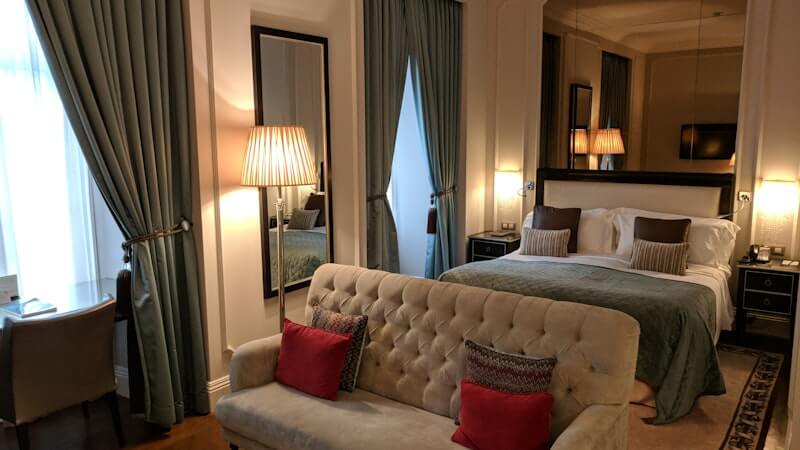
Airbnb Interior Design AI: Improve a Rental Before You Renovate
Use Airbnb interior design AI to preview guest-friendly bedroom, living room, and listing photo concepts before upgrading a short-term rental.
For Airbnb and short-term rental hosts, interior design is not just about taste. It affects listing photos, guest expectations, perceived value, and the confidence people feel before booking.
But upgrading a rental can be risky. Furniture, paint, lighting, bedding, art, and decor all cost money. If the direction is wrong, the listing may still feel generic after the investment.
Airbnb interior design AI helps hosts preview better room directions before renovating or buying. With Roomagic, you can upload a photo of a bedroom, living room, kitchen, bathroom, balcony, or guest suite and generate an AI redesign that shows how the space could look with a stronger style and guest-focused mood.
Why short-term rentals need clearer visual direction
Guests usually judge a property quickly. They scan the first few photos, decide whether the space feels clean and inviting, and compare it with other options nearby. A room does not need to be expensive, but it should feel intentional.
Many rentals miss that mark because the design decisions were made one item at a time. A bed frame from one source, a rug from another, art added later, lighting chosen for function, and a sofa bought for price can all work individually while the room still feels unfinished.
AI interior design can help by showing a complete direction. It gives you a visual target before you start buying individual pieces.
Rooms Airbnb hosts should test first
Start with the rooms that influence booking confidence most.
Bedrooms matter because guests want rest, cleanliness, and comfort. AI can help preview calmer bedding, warmer lighting, better wall treatment, and a more hotel-like mood without guessing from generic inspiration.
Living rooms matter because they show how guests will spend downtime. A stronger living room concept can make the property feel social, relaxing, or family-friendly depending on your audience.
Kitchens and dining areas matter when the property is positioned for longer stays. Even small visual changes such as warmer lighting, cleaner surfaces, better stools, or a more cohesive material palette can improve perceived quality.
Outdoor spaces, balconies, patios, and gardens can also be powerful if they photograph well. AI concepts can help you decide whether a small seating area, plants, lighting, or a more finished style is worth pursuing.
You can review examples of public AI room transformations in Explore, or see how Roomagic handles room photos and style selection on the Features page.
Design styles that work for Airbnb listings
The best Airbnb design style depends on location, price point, and guest expectations. A city apartment may benefit from a clean Modern or Scandinavian direction. A cabin or rural stay may need warmer Rustic or Farmhouse cues. A boutique studio may work with Japandi, Minimalist, or Contemporary styling.
The goal is not to make every rental look the same. The goal is to make the space easier to understand in photos. A strong style gives guests a clear promise: calm bedroom, bright family living room, cozy weekend escape, polished city stay, or creative studio.
AI interior design can help you test whether that promise is visible. If the result feels more bookable, save the direction and identify the practical changes behind it: bedding, wall color, lighting, rug, art, furniture shape, and plant placement.
How to use AI before spending money
Begin with current listing photos or fresh room photos. Use clear, level images that show the full space. If a room is cluttered, remove temporary items first so the AI can focus on structure and design direction.
Generate several versions rather than relying on one result. Try a brighter direction, a warmer direction, and a more premium direction. Compare which one fits the property and the likely guest.
Then turn the AI concept into a phased upgrade list. You may not need to renovate everything at once. Sometimes the strongest improvements come from bedding, curtains, lamps, art, rugs, and decluttering. In other cases, the AI may reveal that paint color or flooring tone is holding the room back.
For hosts, the best test is commercial rather than personal: would this version make the listing photo clearer, more trustworthy, and easier to book? A design that feels beautiful but impractical for cleaning, durability, or guest turnover should be simplified before you use it as a buying guide.
Use the result to improve listing photos
A good AI redesign can also help you plan better listing photography. Look at where the visual focus lands. Does the bed need a clearer headboard wall? Does the living room need a warmer lamp in the corner? Does the dining area need a cleaner table setup?
Even if you do not copy the design exactly, it can help you understand what the final listing photo should communicate. That makes shopping and staging more focused.
Start with one high-impact room
If you manage a rental, do not start by redesigning everything. Pick the room that most affects bookings or reviews. For many properties, that is the primary bedroom or living room.
Upload a clear photo, test a few styles, and choose the direction that feels most aligned with your guests. Then use the concept as a visual brief for shopping, staging, or working with a local designer. If you are improving a small rental or studio, also read the small-space AI room design guide. When you need more room concepts, check Pricing and generate a broader set of options.