
Photo to Home Design AI: Redesign Your Home From a Picture
Use photo to home design AI to upload a room picture, preview realistic redesign ideas, compare styles, and plan a better home makeover online.
Most people do not start a home project with a floor plan. They start with a photo of the room that bothers them.
Maybe the living room feels flat, even after you bought a decent sofa. Maybe the bedroom has the right furniture but never feels finished. Maybe the kitchen is not ready for a full renovation, but you still want to know whether warmer cabinets, better lighting, or a cleaner color palette would make it feel new.
That is the practical promise behind photo to home design tools. Instead of staring at inspiration images from someone else's house, you upload your own room photo and use home design AI to preview what the space could become. The result is not a construction document or a shopping list. It is a fast visual direction that helps you make better decisions before spending money.
With Roomagic, the process is simple: upload a clear room photo, choose a room type and style, then generate a realistic AI interior design concept. It is especially useful when you want to compare several design directions on the same room instead of guessing from mood boards.
What is photo to home design AI?
Photo to home design AI means using a real picture of your room as the starting point for an interior design preview. Instead of typing a generic prompt like "modern living room," you upload the space you actually want to improve. The AI uses the visible room layout, furniture, walls, flooring, windows, lighting, and style choices to create a new visual direction.
This makes it useful for early home makeover planning. You can test whether a room should feel warmer, brighter, more modern, more minimal, more colorful, or more renter-friendly before you buy anything. The result is not a measured renovation plan, but it can help you decide what kind of design direction is worth exploring.
Why AI home design from a photo works so well
Traditional inspiration has one big weakness: it rarely matches your actual room. A beautiful California living room with 12-foot ceilings, perfect daylight, and custom built-ins does not answer what will work in a suburban family room, a rental apartment, or a small bedroom with one awkward window.
Photo to interior design is different because the room itself becomes the starting point. The AI can use visible information from the photo: wall placement, flooring, ceiling height, window location, natural light, furniture scale, and the camera angle. That context makes the design output more useful than a generic rendering.
It also changes the kind of question you can ask. You are not asking, "Do I like Japandi design?" You are asking, "Does Japandi make my bedroom feel calmer?" You are not asking, "Is modern design popular?" You are asking, "Does a modern palette make my living room look more expensive, or does it feel too cold?"
That shift matters. Good design choices are personal, but they are also spatial. The same style can look elegant in one home and awkward in another.
What home design AI can help you decide
Home design AI is most useful early in the planning process, when you have too many options and not enough visual confidence. It can help you compare room-level decisions before you commit to paint, furniture, lighting, flooring, or decor.
Common photo to home design questions include:
- Would this room look better with a modern, Scandinavian, Japandi, farmhouse, or minimalist style?
- Should I change the wall color, rug, lighting, curtains, furniture scale, or material palette first?
- Can I refresh the room without a full renovation?
- Which design direction makes the space feel larger, calmer, warmer, or more expensive?
- What changes are worth discussing with a partner, decorator, contractor, or furniture salesperson?
For a living room, you can test whether the space looks better with a lighter sofa, a larger rug, warmer lamps, a simpler media wall, or a stronger focal point. For a bedroom, you can preview softer bedding, calmer paint colors, wall sconces, natural wood, or a more hotel-like layout. For a kitchen, you can explore cabinet tones, backsplash direction, pendant lights, and the overall mood before touching the real materials.
If you want to understand the broader workflow, read the dedicated guide to AI interior design from photo or review the AI interior design features page. You can also browse Explore to see how different room types and styles translate into before-and-after design concepts.
If your project is already clear, choose a focused entry point: AI interior design for a general room photo, AI living room design for seating and layout decisions, AI bedroom design for a calmer sleep space, AI kitchen design for cabinets and materials, AI bathroom design for remodel constraints, or AI garden design for outdoor curb appeal and planting ideas.
Example: modern living room from a photo
A modern living room redesign usually works best when the current room has too many competing details: heavy furniture, mismatched woods, small rugs, cluttered shelving, or lighting that makes everything feel flat.
In a photo to home design workflow, the AI can test a cleaner version of the room while keeping the basic architecture recognizable. A good modern concept may introduce lower-profile seating, a larger neutral rug, warmer accent lighting, fewer small objects, and a clearer focal wall. The goal is not to make the room look like a showroom. The goal is to see whether a cleaner design language gives the space more order.
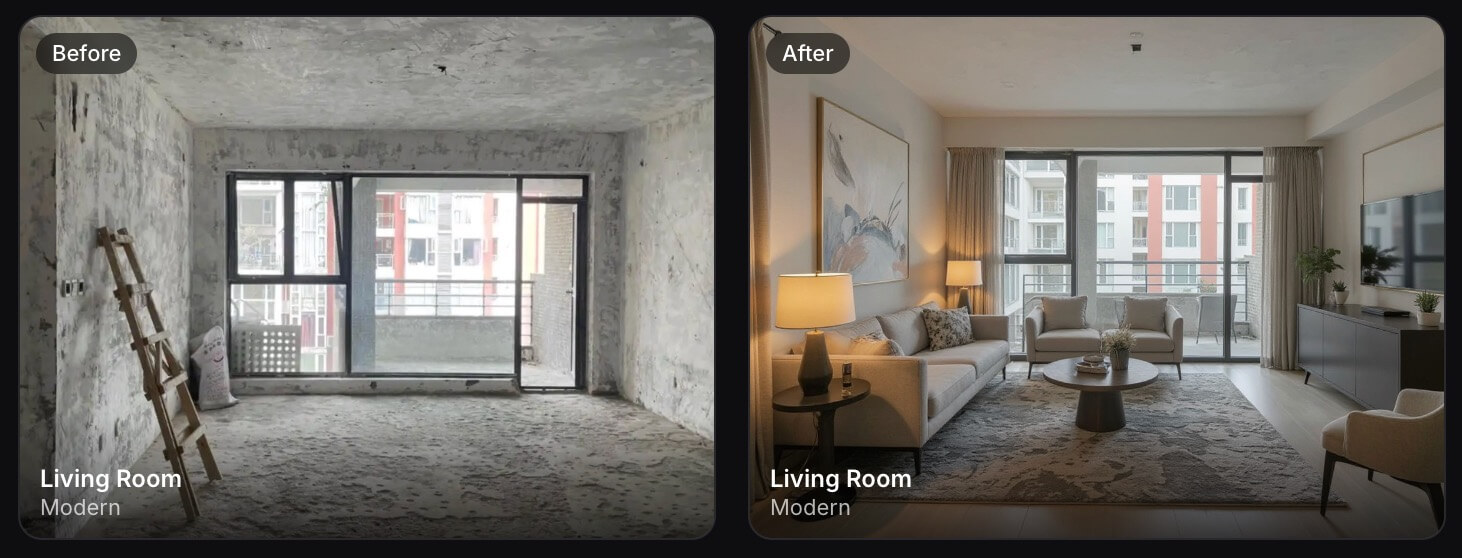
When you review a modern AI result, look past individual furniture pieces. The important signals are scale, contrast, lighting, and visual calm. If the room suddenly feels larger or more balanced, the direction may be worth developing.
Example: Minimalist bedroom from a photo
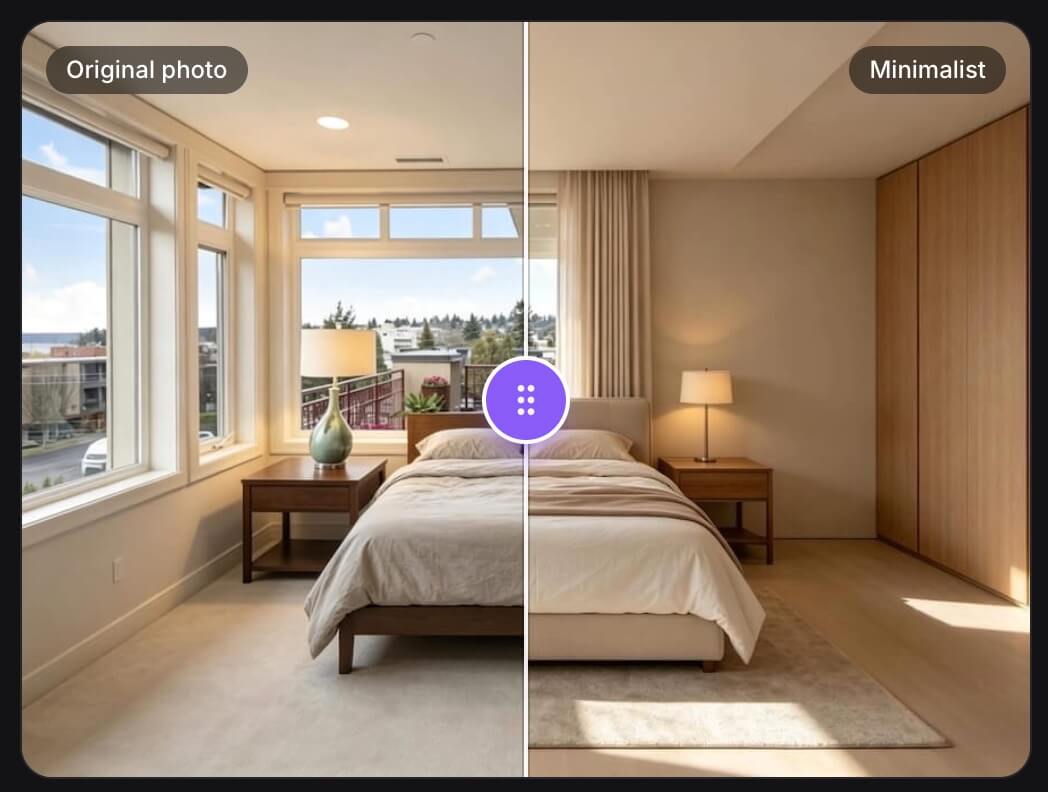
Minimalist design is a strong choice for bedrooms because it tends to prioritize light, comfort, and simplicity. It can soften a plain bedroom without making it feel overly decorated.
With home design AI, a Minimalist bedroom preview might show lighter bedding, pale wood, softer curtains, warm white walls, simple nightstands, and layered lighting. This is useful if your current bedroom feels dark or unfinished but you do not want a dramatic renovation.
The best Minimalist results usually feel livable, not empty. If the AI version looks calm but too bare, use it as a direction and add personal texture later: a better throw, framed art, a reading lamp, or storage that hides daily clutter.
Example: Japandi dining room from a photo
Japandi is popular because it blends Japanese restraint with Scandinavian warmth. In real homes, it can work beautifully for dining rooms, breakfast nooks, and open-plan spaces that need a quieter mood.
A photo to interior design result in this style may test natural wood, linen textures, low-contrast walls, simple pendant lighting, and fewer decorative objects. The useful part is seeing whether your room can handle that restraint. Some spaces become peaceful. Others need more color, pattern, or contrast to avoid looking unfinished.
If you are comparing styles, run Japandi against Modern, Minimalist, and Contemporary options on the same photo. The winner is usually obvious when you see them side by side.
Example: farmhouse kitchen refresh from a photo
Not every AI home design project needs to look sleek. Many U.S. homeowners want kitchens that feel warmer, brighter, and more welcoming without losing everyday practicality.
A farmhouse-inspired kitchen concept might test shaker-style cabinet fronts, warmer hardware, softer white walls, wood accents, pendant lighting, open shelves, or a more inviting breakfast area. Even if you are not replacing cabinets soon, the AI design can help you see which smaller changes would move the room in the right direction.
This is where AI can save money. You may realize that lighting and wall color matter more than a full cabinet replacement, or that the room needs a different material balance before it needs new appliances.
How to get a better result from your room photo
The input photo still matters. AI can only work with the room information it can see.
Take the photo from a corner or doorway so the frame includes the floor, walls, windows, and major furniture. Keep the camera level. Avoid extreme wide-angle distortion, heavy shadows, and close-up shots of one object. If the space is dark, turn on lamps or photograph the room during daylight. If temporary clutter blocks the layout, move it out of frame.
You do not need to make the room perfect first. In fact, it is fine if the room looks ordinary. The point of photo to home design is to start from a real space. But the photo should be clear enough for the AI to understand the room's structure.
For more room-specific ideas, read the guides on AI interior design from photo, AI room design from photo, AI living room design from a photo, AI bedroom design from a photo, and room design AI for small spaces.
How to turn an AI home design preview into a plan
After you generate a few redesign ideas, compare them like a decision board. Pick the version that best solves the actual room problem, not just the one that looks most dramatic. Then list the changes that repeat across the strongest results: a lighter wall color, a larger rug, warmer lighting, cleaner storage, softer textiles, or a simpler furniture layout.
Next, separate the ideas into three groups:
- Easy updates such as paint direction, decor, lamps, curtains, bedding, art, and small furniture.
- Medium changes such as rugs, main seating, dining chairs, cabinet hardware, vanities, or lighting fixtures.
- Professional or renovation items such as built-ins, flooring replacement, construction, plumbing, electrical work, and structural changes.
This keeps the AI result practical. You can use it as a visual reference, but still make real-world decisions based on budget, measurements, maintenance, and what you are allowed to change.
How to use the AI result without overthinking it
Treat the AI output like a design conversation, not a final answer. Some details may be unrealistic, too expensive, or simply not your taste. That is normal. The value is in the direction.
Ask yourself a few practical questions:
- Does this style make the room feel better for the way I actually live?
- What changed the most: color, furniture scale, lighting, materials, or layout?
- Which parts could I copy affordably?
- Which parts look nice but would be hard to maintain?
- Does the result make the room feel more personal or more generic?
The best AI room design results give you language for the next step. Instead of saying, "I want something nicer," you can say, "The room needs warmer lighting, a larger rug, cleaner storage, and lighter wood." That is much easier to act on.
Where Roomagic fits in your design process
Roomagic is useful when you want a fast visual answer before making a home decision. You can upload a real room photo, generate several interior design styles, compare the results, and save the strongest direction as a reference.
It works well for homeowners planning a room refresh, renters who want decor ideas without construction, Airbnb hosts improving listing photos, and anyone who needs to explain a design preference to a partner, contractor, or furniture salesperson. If you are working on a short-term rental, the Airbnb interior design AI guide is a good next read.
AI will not measure your room, check building codes, or replace a professional designer on complex renovations. But it can remove a lot of early uncertainty. It helps you see what your room could become before you buy the sofa, paint the wall, order the rug, or call a contractor.
When you are ready to test your own space, start from the Roomagic homepage, review current options on Pricing, and upload one clear photo of the room you want to improve.
Photo to home design AI FAQ
Can AI redesign my home from one picture?
Yes, AI can create a visual home design concept from one clear room picture. A single image is usually enough for style exploration, color ideas, furniture direction, and makeover inspiration. For accurate measurements, construction, or purchasing decisions, you still need real dimensions and professional judgment.
What kind of photo works best for AI home design?
Use a wide, level photo that shows the room structure, floor, walls, windows, doors, and main furniture. Photos taken from a corner or doorway usually work better than close-ups. Good lighting and less clutter also help the AI understand the space.
Is photo to home design AI good for small rooms?
Yes. Small rooms are often good candidates because AI previews can help you compare lighter colors, smarter storage, smaller furniture, better lighting, and simpler layouts before buying anything. The key is to keep the photo clear and ask for realistic, budget-friendly changes.
Can I use Roomagic for a full renovation plan?
Roomagic is best for early visual planning, style comparison, and makeover direction. It does not replace measured drawings, building codes, contractor estimates, or professional design work for complex renovations. Use the AI result as inspiration and a communication reference before making final decisions.